Carrier Board Bring-up
The Modalix SoM Rev 2 connects to a carrier board through a 260-pin SODIMM connector with standardized pin assignments, and works with any carrier board compatible with the NVIDIA Jetson Orin NX or Orin Nano.
Verify electrical pin compatibility between the SoM and the carrier board before connecting them.
SDK 2.1 or higher, with the Palette package installed for graphics support. You should also have the SoM data sheet, the SoC data sheet, and the Modalix SoM Comparison Guide to hand.
Handling the Board Safely
- Use proper ESD grounding: an antistatic wrist strap and an ESD-protected mat.
- Do not touch the board while powered on.
- Store the board in an antistatic bag before placing it on any surface.
- Handle the module by its edges; avoid touching onboard ICs and components.
- Use the supplied power supply.
- After power-on, confirm every power-indication LED is lit.
- Keep water and other conductive liquids away from the board — contact can damage it.
Carrier Board Components
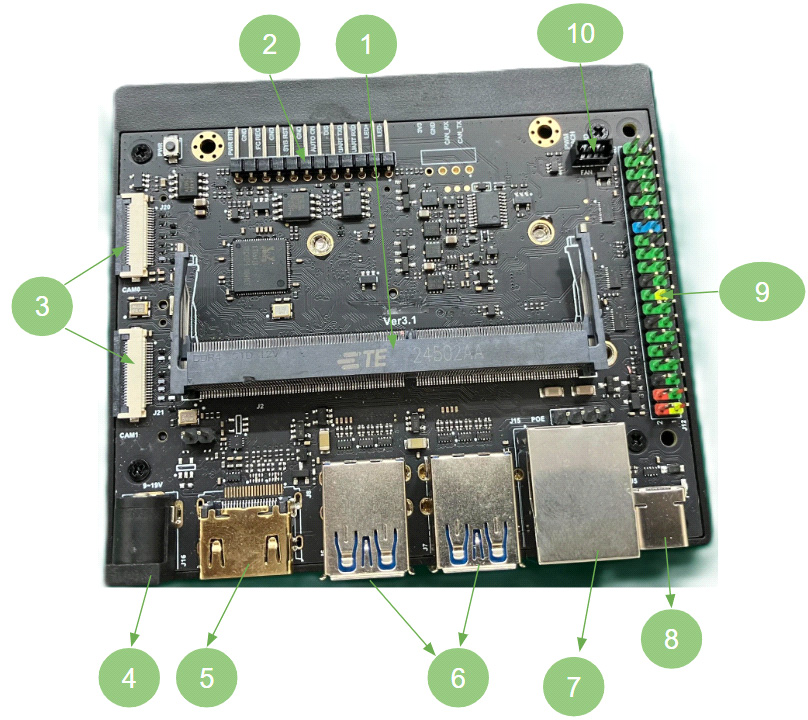
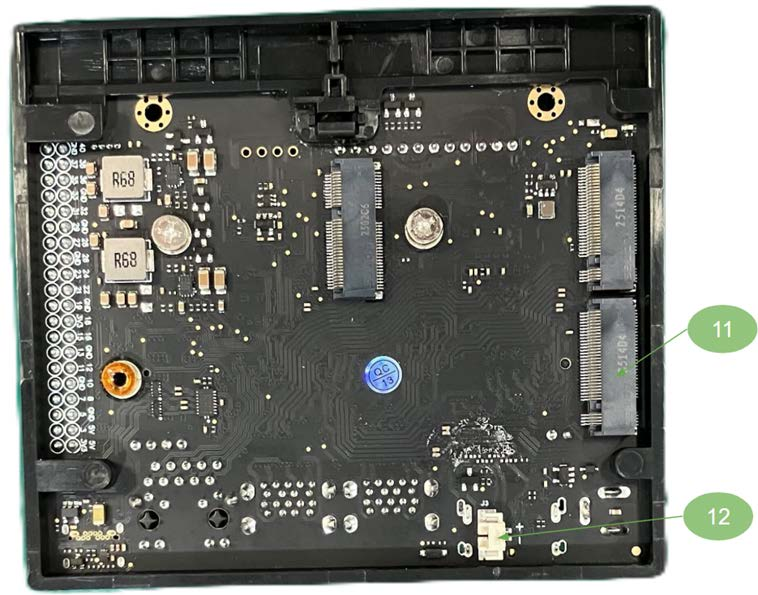
The reference bring-up used a Waveshare carrier board. Any board conforming to the 260-pin SODIMM pinout will work. The numbers in the table below correspond to the callouts in these views.
| # | Component |
|---|---|
| 1 | 260-pin SODIMM socket for the SiMa system on module |
| 2 | 12-pin header — power supply, reset button, force-recovery setting, serial debug, auto power-up enable, power indicator |
| 3 | 2× 22-pin CSI camera connectors |
| 4 | DC power jack, 9 V–19 V, 5.5 × 2.5 mm male plug |
| 5 | HDMI connector, 4K UHD (3840 × 2160) |
| 6 | 4× USB 3.2 Type-A ports |
| 7 | RJ45 Gigabit Ethernet |
| 8 | USB Type-C for debug logs |
| 9 | 40-pin header |
| 10 | 4-pin PWM fan header |
| 11 | M.2 Key M for NVMe SSDs |
| 12 | RTC backup battery header, PH1.25 2P |
The Modalix SoM
The bring-up used Modalix SoM Rev 2. It carries the MLSoC Modalix die, two LPDDR5 packages, 16 GB eMMC and SPI flash, and connects through the goldfinger SO-DIMM edge connector.
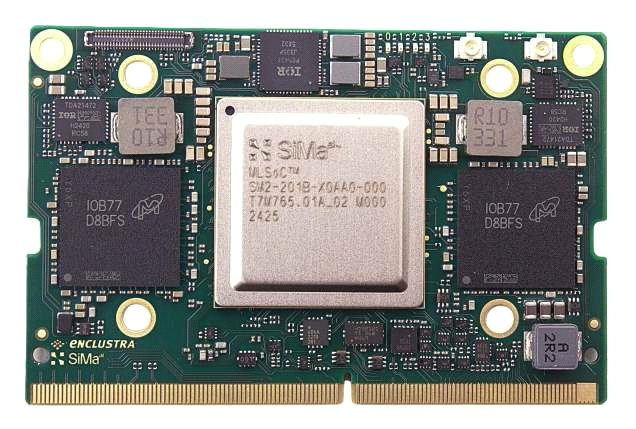
Figure 3. SoM, top view — Modalix SoC, LPDDR5 DRAM (×2), PMIC, and the goldfinger connector
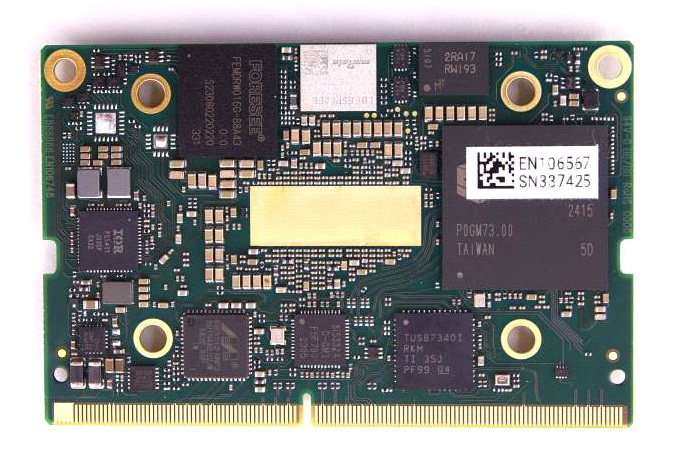
Figure 4. SoM, bottom view — 16 GB eMMC, SPI flash, HDMI controller, Ethernet PHY, USB controller, clock generator
These views are for labelling only. The board ships with a heatsink attached.
What the Connector Exposes
The functional block diagram shows which interfaces reach the SO-DIMM connector, and how they are routed inside the module. Use it when deciding what your carrier board can take from the SoM.
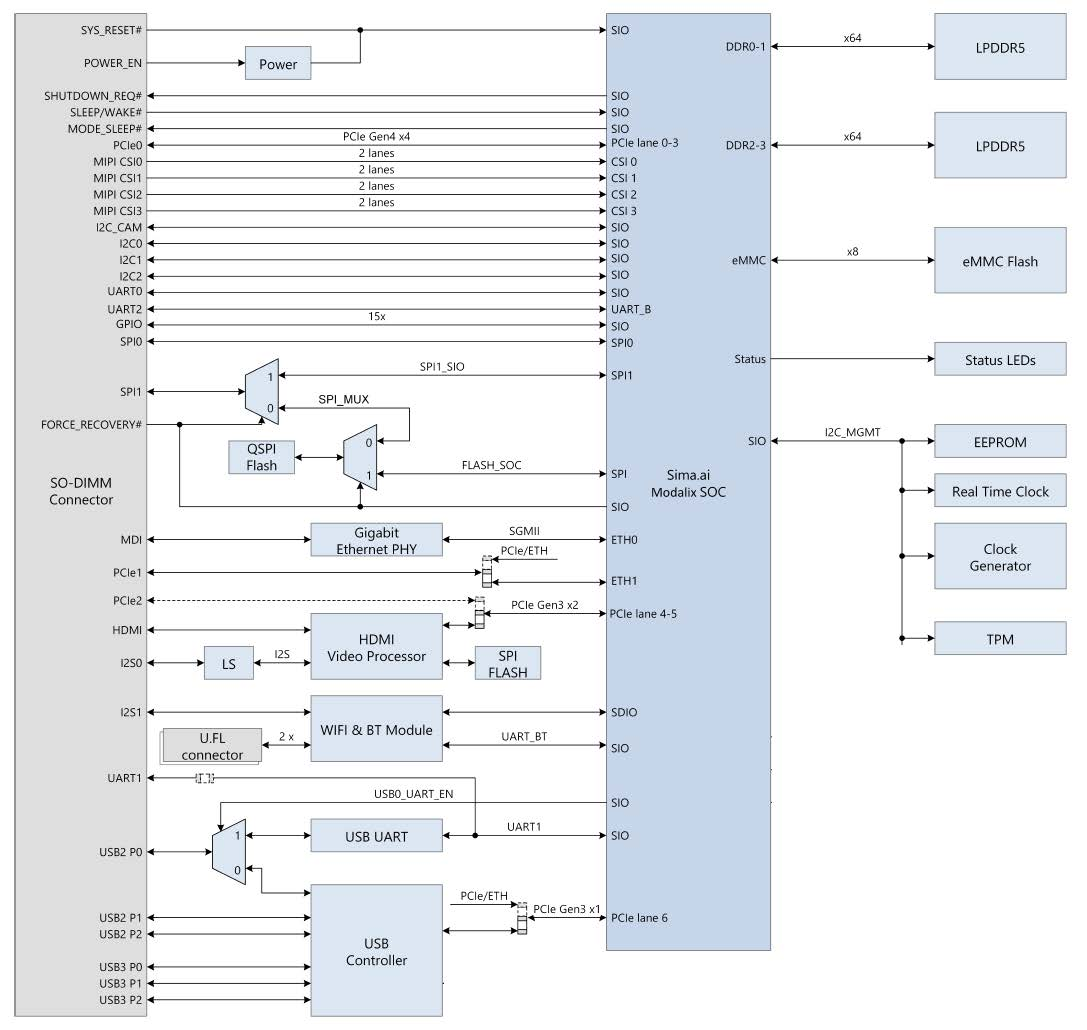
| Interface | At the connector |
|---|---|
| PCIe | PCIe0 Gen4 ×4 (lanes 0–3), PCIe1, PCIe2 Gen3 ×2 |
| MIPI CSI | MIPI CSI0–CSI3, 2 lanes each |
| Ethernet | MDI through the Gigabit Ethernet PHY (SGMII to ETH0); ETH1 shares PCIe1 |
| USB | USB2 P0–P2 and USB3 P0–P2 through the USB controller |
| Display | HDMI through the HDMI video processor |
| Audio | I2S0 (via level shifter), I2S1 |
| I2C | I2C_CAM, I2C0, I2C1, I2C2 |
| UART | UART0, UART1, UART2 |
| GPIO | 15× |
| SPI | SPI0, SPI1 — SPI1 is muxed with the on-module QSPI flash |
| Power and control | SYS_RESET#, POWER_EN, SHUTDOWN_REQ#, SLEEP/WAKE#, MODE_SLEEP#, FORCE_RECOVERY# |
On-module and not brought out: LPDDR5 (×64 on DDR0-1 and DDR2-3), eMMC flash
(×8), status LEDs, and the I2C_MGMT devices — EEPROM, real-time clock, clock
generator and TPM.
FORCE_RECOVERY# drives the SPI mux that selects between the on-module QSPI
flash and the SoC flash path. Expose it if you want recovery without
disassembling the system.
What Needs Software Adaptation
Works Without Changes
These components are on the SoM itself and work on any carrier board following the 260-pin assignment standard:
SiMa Modalix device · DDR · SPI flash · eMMC flash · USB controller · RTC · Ethernet PHY · HDMI video processor
Depends on the Carrier Board
These may need configuration or software changes for your board:
| Component | Notes |
|---|---|
| MIPI or GMSL cameras | See Cameras below |
| USB hub | |
| NVMe device | |
| Wi-Fi / Bluetooth | |
| UART2 | Assigned as the Secure Boot terminal on Modalix SoM Rev 2. On NVIDIA systems this port is the terminal interface — a common source of confusion when porting. |
| UART1 | The U-Boot and Linux terminal on Modalix SoM Rev 2, wired to an FTDI UART-to-USB converter. On an NVIDIA carrier board this typically defaults to USB OTG (USB3). Some carrier boards expose UART1 on the 40-pin header. |
Software Configuration
Most configuration happens through the Linux device tree, with overlays layered on top for board-specific differences. That is what makes one BSP serve several carrier boards.
- Build the BSP from Source — build environment, kernel, U-Boot, device trees, and installing the result.
- Device tree usage model and overlay notes — upstream kernel documentation.
- Example overlays in the kernel tree.
Board-specific overlay sources (.dtso) are in the
meta-simaai Yocto layer, under
recipes-kernel/oot-dtbo/files.
eLxr is the preferred path for board bring-up. To compare it with bringing up
a board with Yocto, see eLxr or Yocto.
Cameras
To use a camera on a DevKit, select a shipped overlay — see
MIPI Camera Interfaces,
which covers choosing the right .dtbo and setting it in U-Boot.
On a custom carrier board you may need to author the overlay instead, because the power line, I2C bus and regulators differ from the reference design. Three pieces are usually needed.
Drive the camera power-down line through a GPIO hog — here port 5, GPIO 6:
&port5 {
    cam-hog0 {
        gpio-hog;
        gpios = <6 0>;          /* GPIO_ACTIVE_HIGH */
        output-high;
        line-name = "cam0_powdn";
    };
};
Enable the I2C bus the sensor sits on — here SIO port 5, I2C #2:
&i2c52 {
    status = "okay";
    clock-frequency = <400000>;
    #address-cells = <1>;
    #size-cells = <0>;
};
Declare the camera rails as fixed-voltage regulators, added to the root node through an overlay fragment, so Linux knows those rails exist and are powered.
Start from the overlay examples in the kernel tree. Camera controls, PHY frequency, DMA for a second camera, the data highway and ISP configuration are not yet documented here.
To integrate a camera that has no overlay, see Integrate Your Own Camera.
References
| Reference | Where |
|---|---|
| Building the kernel, device trees and overlays | Build the BSP from Source |
| Modalix device trees | arch/arm64/boot/dts/simaai |
| Example overlays | dts/simaai/overlays |
| Yocto layer and board-specific overlay sources | meta-simaai |
| Device tree usage model | docs.kernel.org |
| Overlay notes | docs.kernel.org |
Next Steps
- Low-Speed I/O — GPIO, UART, I2C and SPI on the SIO blocks.
- MIPI Camera Interfaces — using cameras on a DevKit.