Hardware Preparation
note
Please install or upgrade sima-cli before continuing. This guide is intended for use with the latest sima-cli version.
Before you begin:
- Supported host platforms: Ubuntu 22.04 LTS and Ubuntu 24.04 LTS.
- Windows 10/11 host support is currently in beta testing.
- Configure your host machine's UEFI/BIOS settings for PCIe driver support.
- On Intel-based machines, enable SRIOV, IOMMU, and VT-D.
- On AMD-based machines, disable AMD-V and enable IOMMU.
Prepare the PCIe Card
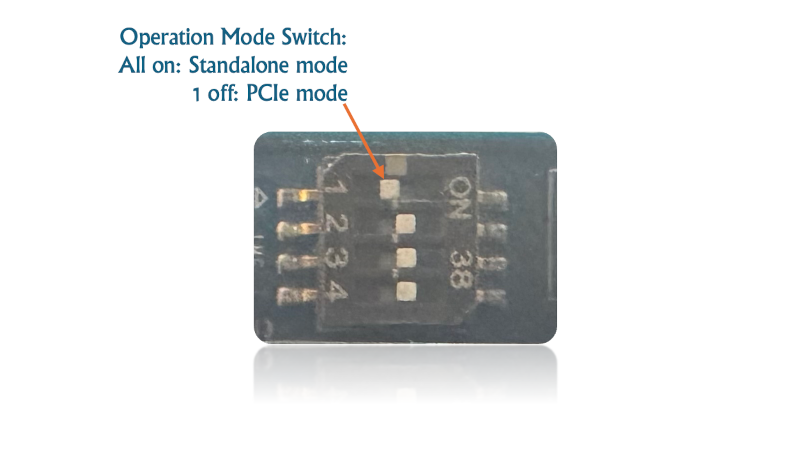
- On the Modalix PCIe Card, locate the four DIP switches shown above. Make sure switch #1 is in the
OFFposition. - Make sure the Run/Program switch is
ON. - Power off the host, insert the Modalix PCIe Card into the PCIe slot, and power on the host.
- Keep the DIP switches in their factory-default positions unless instructed otherwise.
- If the host motherboard provides both a primary (blue) and a non-primary (black) PCIe slot, install the Modalix PCIe Card in the secondary (black) slot.
- Connect the card's serial/UART connector to the host for bring-up and debugging.
- The PCIe card also has a physical Ethernet port for direct network access.
For a detailed view of the PCIe card interfaces, switches, and connectors, see Modalix PCIe Card.
note
In rare cases, you may not want the driver to load automatically when the host reboots. To disable automatic loading, create or edit /etc/modprobe.d/blacklist.conf and add blacklist sima_mla_drv. Then run update-initramfs and reboot the host. After reboot, load the drivers manually with insmod or modprobe.