Driver Installation
Install the host driver for your operating system, then verify that the host can discover the Modalix PCIe Card.
- Linux
- Windows
Run the following command on the Linux host to install the latest driver.
sima-user@sima-user-machine:~$ sima-cli install drivers/linux
... ... ...
=== Driver Installation Validation ===
  Component            | Status     | Details
  ----------------------------------------------------------------
  GStreamer            | PASS       | ✅ GStreamer plugin 'pciehost' installed
  Kernel Module        | PASS       | ✅ Kernel module 'sima_mla_drv' installed
  PCI Devices          | PASS       | ✅ Detected SiMa PCIe device(s):
  - 0000:04:00.0 Modalix HHHL v2              driver=sima_mla_drv

✅ Installation complete.
To install a specific driver version, use the -v flag:
sima-user@sima-user-machine:~$ sima-cli install drivers/linux -v 2.1.3
After driver installation, power cycle the host machine before validation.
PCIe driver support for legacy MLSoC PCIe cards ended with SDK 2.0.0. The driver installed by the command above supports Modalix. If you are using a legacy MLSoC PCIe card, install the 2.0.0 driver using sima-cli install drivers/linux -v 2.0.0.
Run the following command on the Windows host to install the driver.
This feature is currently in technical preview. Installing this driver places the system into driver test-signing mode. Confirm the prompt before any system changes are made.
C:\Users\sima> sima-cli install drivers/windows
... ... ...
  ✅ Downloaded: pcie_develop_10082025_2.00.081025.1_B31.exe
  🚀 Running installation script in: C:\Users\sima
  📜 Script: pcie_develop_10082025_2.00.081025.1_B31.exe
  ╭─ Post-Installation Instructions ─╮
  │                                  │
  │  Driver successfully installed   │
  │                                  │
  ╰──────────────────────────────────╯
  ✅ Installation completed successfully.
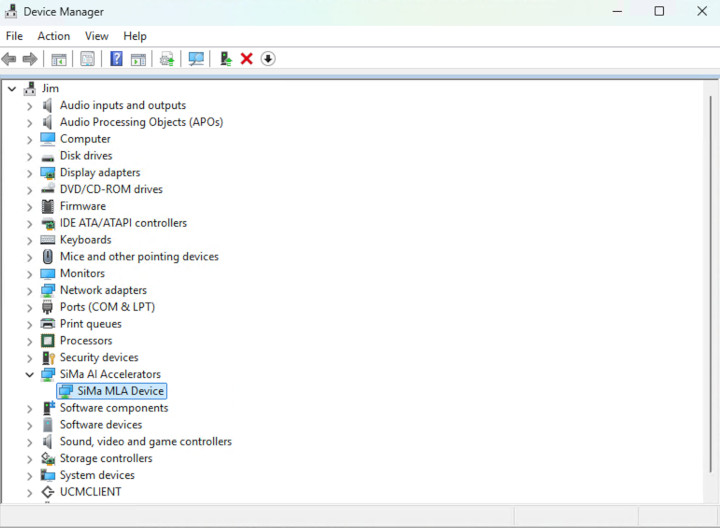
Check the Windows device manager for the SiMa AI device.
After driver installation, power cycle the host machine before validation.
Verify and Test
Run the discovery command to confirm PCIe enumeration:
sima-cli device discover
If setup is correct, the command output lists connected SiMa PCIe device(s).