Convert to eLxr
Use this guide to convert an existing SiMa.ai Yocto-based DevKit to the eLxr runtime environment, and to revert to Yocto when needed.
The eLxr platform is available starting from SDK 2.0.0 and later on the Modalix DevKit.
Converting to eLxr requires a tRoot update and eMMC reflash facilitated by Net Boot Recovery.
The eLxr platform replaces the legacy Yocto environment as the default runtime for SiMa.ai DevKits. It provides:
- Simplified updates — unified root filesystem layout with a larger root filesystem.
- Standard package manager — Debian-based foundation with persistent package management.
Before you migrate, check which firmware the DevKit is running. Connect through serial or SSH and run:
cat /etc/buildinfo | grep DISTRO
You should see either:
DISTRO = poky
or
DISTRO = eLxr
If you see poky, follow the steps below to migrate.
Step 1. Update to the Latest tRoot
Before you convert to eLxr, update the DevKit to the latest tRoot image.
This update makes the tRoot (trusted root) compatible with eLxr.
With the host on static IP 192.168.1.10 and the DevKit reachable at 192.168.1.20 (see network setup):

sima-user@sima-user-machine:~$ sima-cli update --ip 192.168.1.20 2.1.3 --troot_only
After the update completes successfully, power cycle the DevKit to apply the changes.
Step 2. Netboot the eLxr Image and Flash the eMMC
The remainder of the conversion uses the standard TFTP netboot + flash procedure documented in Net Boot Recovery. Follow that procedure with the eLxr-specific values below:
- Step 2 (Start TFTP server): use
--boardtype modalix --fwtype elxr -v 2.1.3. - Step 3 (Configure U-Boot): set
cpio_name=simaai-image-palette-modalix.cpio.gzin addition toboot_targets=netbefore runningboot. - Step 4 (Flash): type
fat thenetboot>prompt.
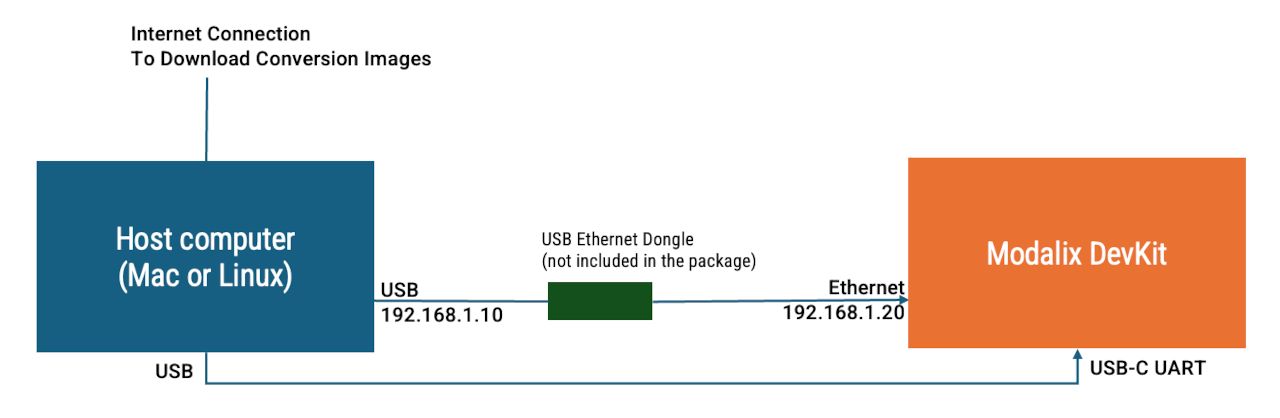
Connection Diagram
After flashing completes and you power-cycle the DevKit, it runs eLxr from eMMC.
Step 3. Install NEAT and Try Out Apps
With the DevKit running eLxr, install the Palette Neat SDK and run the example applications. Follow the NEAT documentation for installation and trying out apps.
Revert to Yocto (Optional)
To switch back to Yocto, follow Net Boot Recovery again with --fwtype yocto. The cpio_name U-Boot variable is not required for Yocto targets — only setenv boot_targets net, saveenv, boot.
There is no minimum tRoot version requirement when converting back to Yocto, so Step 1 above can be skipped.
If NFS-related error messages appear on the serial console after converting to eLxr, they can be safely ignored.
Summary
- Update to the latest tRoot image (≥ 2.0.0).
- Follow Net Boot Recovery with
--fwtype elxrand the eLxrcpio_nameto flash eLxr to eMMC. - Install the Neat SDK and try out apps via the NEAT documentation.